What if the clearest email to a senior leader is also the one that takes the least time to write? Learning how to write professional emails in English to senior leadership starts with putting your purpose near the top, then giving only the context needed to make your request clear. For a meeting request, state what you’d like to discuss and suggest a time; after a presentation, send a concise follow-up within 24 hours.
It’s understandable to second-guess your wording when writing to senior leaders, especially if English isn’t the language you use most at work. A clear structure makes your email easier to draft and easier for a busy reader to act on.
This guide explains how to format a professional email, choose a confident greeting and closing, and check for errors, tone, and missing attachments. You’ll also find practical ways to handle meeting requests and follow-ups, so you can state your next step clearly and feel more confident pressing send.
Key Takeaways
- Make your purpose easy to spot by stating the request before adding background.
- Use a clear subject line, courteous greeting, brief body and deliberate sign-off.
- Before sending, review the tone and wording, and make sure any mentioned attachment is included.
- Keep each email focused on one topic so senior readers can quickly understand the next step.
- Build confidence with practical English communication skills through Learning Explorer’s Business English Course.
How do you write a meeting request and follow-up email?
In Singapore, use courteous, clear English and follow the recipient’s workplace conventions. A suitable greeting, direct request, and thoughtful closing help keep the exchange respectful.
1. Put the Request Up Front
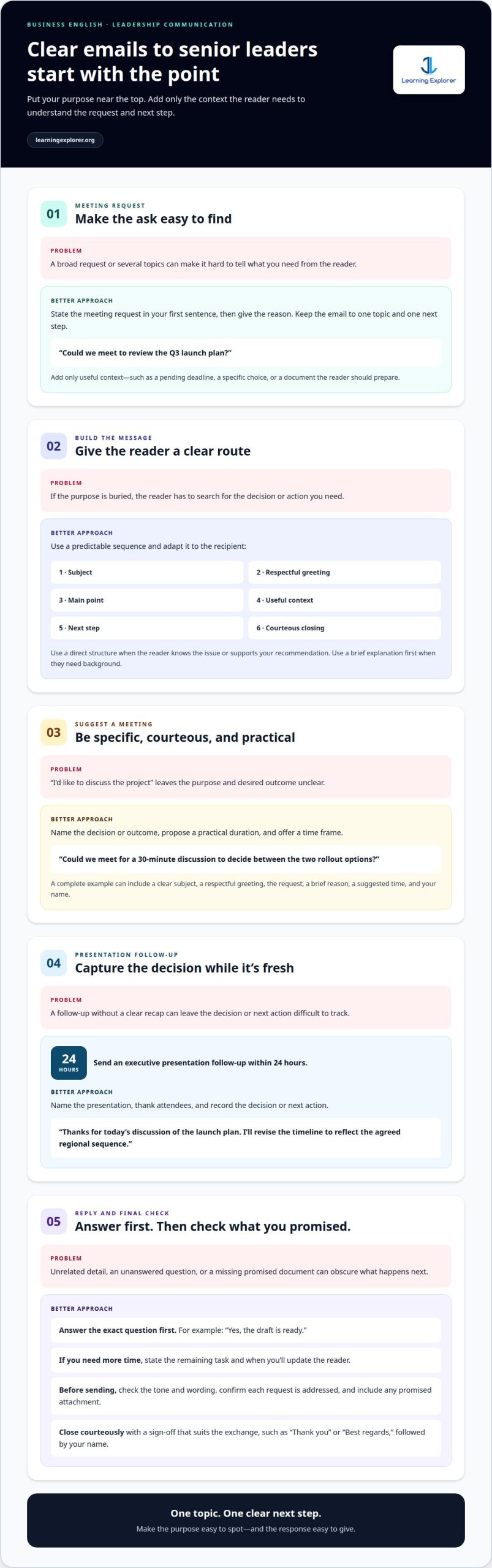
State the meeting request in your first sentence, then give the reason. For example: “Could we meet to review the Q3 launch plan?” This helps your manager see the purpose before reading background. Add only the context needed to make a decision, such as a pending deadline or a specific choice.
Focus the email on one topic and one next step. A request to meet about a launch plan shouldn’t also ask for budget feedback or introduce another project. If the reader needs to prepare, name the document or decision. Use short sentences, then check that the request is easy to spot when skimming.
Offer a practical time frame without making the message feel demanding. A meeting template can propose a 30-minute discussion and give a reason for that duration. For example: “Would you be available for a 30-minute meeting to decide between the two rollout options?”
2. Draft a Meeting Request
Build the email around a clear subject, a respectful greeting, the request, and a brief reason. For example: “Subject: Meeting request: Q3 launch plan. Dear Ms Tan, could we meet for 30 minutes to align on the launch priorities? I can share the draft plan beforehand. Would Tuesday afternoon suit you? Thank you, Alex.” Replace the example details with your actual topic and availability.
For a strategic alignment request, connect the discussion to a shared business goal. Instead of writing, “I’d like to discuss the project,” state the decision: “Could we meet to align the launch timeline with the regional rollout?” The reader can see why their input matters and what the meeting should achieve.
Make every sentence useful to the recipient. Include context, such as the team’s recommendation, only when it helps the leader prepare. Avoid unexplained abbreviations and broad requests like “Please advise.” A specific question gives the reader a clear way to respond, even if they can’t attend.
3. Send a Follow-Up or Reply
Send an executive presentation follow-up within 24 hours. Name the presentation, thank the attendees, and record the decision or next action. For example: “Thanks for today’s discussion of the launch plan. I’ll revise the timeline to reflect the agreed regional sequence.” A concise recap creates a written record and lets the conversation continue when needed.
For a request-and-reply email, answer the exact question first. If a senior leader asks whether the draft is ready, begin with “Yes, the draft is ready,” then explain its status or what happens next. If you need more time, state the remaining task plainly and say when you’ll update them, without adding unrelated detail.
Close with a courteous phrase and your name. Before sending, confirm that you’ve addressed each request and attached any promised document. Keep the closing appropriate to the exchange: “Thank you” suits a formal message, while “Best regards” is a polished sign-off. Don’t add a new request after your closing sentence.
What is the correct format for a professional email in English?
Use a greeting, opening, clear message, supporting context, next step, and closing. For senior leadership, put the main point first when the reader knows the topic or supports it. Use an indirect structure when they need context first. Address the reader respectfully and sign off with your name.
-
Choose a Direct or Indirect Structure
Choose a structure that helps the reader understand your message. Put the main action first when a manager knows the issue or supports your recommendation. For example, “Please confirm the launch date by Friday” states the decision upfront.
Use an indirect structure when the reader needs background before the request. Briefly explain the project change, then state its impact and the action needed. Don’t make the reader search through several paragraphs to find your main point.
-
Use a Professional Email Structure
Arrange the message in a predictable sequence: greeting, opening, key point, useful context, next step, and closing. For example, acknowledge a previous conversation, summarise the decision, and name who is responsible for the next action.
Use a reusable template, but adapt it to each reader. Keep paragraphs focused and use a short list when the message covers several decisions. Executive presence comes from clear reasoning and ownership, not elaborate vocabulary or stiff language—qualities that leadership consultancies like Humanise Solutions focus on when helping teams develop professional excellence.
-
Select an Appropriate Greeting
Address the recipient by name when you know it. “Dear Ms Tan” is a formal option; “Hello Alex” may suit an established working relationship. If you’re unsure of someone’s preferred title, use their name rather than guessing.
Match the greeting to the tone of the existing conversation. A first message to a senior stakeholder may call for a more formal opening than a reply in an ongoing thread. Avoid overly familiar greetings that could distract from your request.
-
Choose a Professional Sign-Off
Choose a closing that suits the message and relationship. “Kind regards” and “Best regards” work for many formal exchanges, while “Thank you” suits a message expressing thanks or asking for help. Add your full name so the reader knows who sent it.
Keep the sign-off consistent with the greeting. Before sending, read the final sentence and closing together; they should sound courteous, not abrupt or overly familiar. If you’re building confidence with workplace phrasing, a Business English Course can support clearer professional communication.
Proofreading for errors, attachments and tone
Before emailing a senior leader, review the tone, wording, and attachments. A focused final check can clarify your request and help you sound confident.
-
Choose an Appropriate Tone
Match the level of formality to your audience and relationship. In a first email to Ms Lim, “Dear Ms Lim” and complete sentences create a respectful tone. A familiar greeting may suit an established conversation.
Keep your wording professional without making it stiff. Replace “You need to approve this immediately” with “Could you review this today so we can proceed?” The second version gives a reason and a clear action without sounding accusatory. Use “immediately” only when the situation is genuinely urgent, and explain why.
Separate facts from opinions. For example, “The vendor has not sent the revised file” describes an observable issue. “The vendor is being difficult” adds judgement that may distract from the decision or approval you need.
-
Read Aloud to Edit for Tone
Read the complete email aloud before sending. Listen for sentences that sound abrupt, defensive, or uncertain. If “I guess we can try this” weakens your recommendation, replace it with a clear position, such as “I recommend testing the revised schedule first.”
Pause at each request and consider how the recipient might interpret it. “As I already said” can sound impatient, even if you mean to clarify. Try “To clarify my earlier message” instead. This small edit preserves clarity and keeps the conversation constructive.
Spend 30 seconds on this final read. Check whether the opening explains the purpose, each sentence supports it, and the closing names the next action. Remove repeated words or a joke that could be misunderstood without your voice or facial expression.
-
Proofread Errors and Attachments
Check spelling, grammar, names, dates, and incomplete thoughts before sending. Read the subject and message together: if the subject says “Budget review” but the body discusses staffing, revise one so they match. Make sure “it,” “they,” or “this” clearly refers to the right person or item.
Search for words such as “attached” and “included,” then confirm the promised file is attached. Open the document to check that it’s the right version and has a clear filename, such as “Launch timeline.” If the email mentions a specific page or figure, make sure that detail appears in the file.
Before sending, verify the recipient, copied readers, attachment, and final sentence. Remove anyone who doesn’t need visibility, and explain why a copied colleague is included. This final review helps your email reach the right audience with a clear, confident tone.
Concise, bottom-line-first communication
Give senior readers a clear route from subject to action. Use a specific subject line, then make the message easy to scan.
-
Write a Concise Subject Line
Keep the subject line to no more than seven words. Name the topic and, when useful, the action: “Decision needed: Q3 launch date” tells the reader what matters. Avoid vague labels such as “Update” or “Question,” which give little reason to open the message.
Use one subject for one topic. If you need feedback on a hiring plan, don’t add a separate budget request in the same email. A focused subject helps the reader connect your message to the right work, especially when several projects need attention.
Remove words that add no useful detail. “A quick update regarding the launch schedule” can become “Launch schedule update.” If the reader must decide, say so directly: “Choose launch date by Friday.” Use a deadline only when it’s real, and explain in the body what decision you need.
Review the subject alongside the greeting and opening sentence. For example, “Hiring plan feedback” should lead into a request to review that plan, not an unrelated staffing issue. This match prevents confusion before the reader reaches the main message.
-
Make the Subject Line Descriptive
Name the topic, the requested action, or both. “Review: regional launch timeline” is more useful than “For discussion,” while “Confirm venue for Monday meeting” signals a clear next step. Use words the reader will recognise from the project or conversation.
Put the most important detail first. If a manager discussed a revised forecast in a meeting that morning, use “Revised forecast: feedback requested.” The reader can see the document and purpose without opening the email. Avoid unexplained abbreviations that may mean different things across teams.
Keep the body aligned with the subject. Begin with the decision or feedback needed, then add only relevant context. For example: “Please share your feedback on the revised forecast before the planning review. I’ve highlighted the two changed assumptions below.” The subject and message now point to one action.
Before sending, check three things: Does the subject name the topic? Does it signal the action? Does the email deliver what it promises? If the subject says “Approval requested,” identify what needs approval and what happens next. If the email only shares information, choose a neutral subject instead.
Keep the email brief enough to scan. Use short paragraphs and separate multiple actions with a list. A clear subject, relevant greeting, and focused message help senior readers find the decision without sorting through unrelated details.
Building confidence in English email writing
Build confidence through repeatable writing habits, not complicated phrases. Practising how to write professional emails in English to senior leadership can start with one real workplace message at a time.
- Keep a personal phrase bank. Save useful wording from messages you’ve written or received. Group phrases under “request,” “update,” and “thanks.” For example, “Could you share your feedback on the attached draft?” can be a starting point. Adapt it to the context each time rather than copying it without checking the details.
- Practise with real work situations. Choose a message you need to send, such as an update to your manager about a delayed report. Write the key point in plain English, then add the reason and next action. This links practice to daily responsibilities and career goals. It also helps you spot sentences that are difficult to write.
- Make one improvement at a time. After drafting an email, review one feature, such as verb tense, article use, or sentence length. For example, change “I am writing for asking your advice” to “I’m writing to ask for your advice.” Keep the meaning intact. Focused edits make progress easier to notice than trying to fix everything at once.
- Use context to choose polite wording. Consider the recipient, relationship, and request before choosing a phrase. “Please send the file today” is direct, while “Could you send the file today so I can complete the report?” gives a reason. Either may suit the situation. Notice how colleagues phrase similar requests, then choose wording that feels natural at work.
- Learn from each exchange. When a colleague replies clearly, identify what made your message easy to answer. If they ask what “the latest version” means, name the document next time. Keep examples that worked and revise phrases that caused confusion. This is a practical way to improve how to write professional emails in English to senior leadership. For guided workplace writing practice, explore the Business English Course.
Learning Explorer
Learning Explorer helps learners develop English for workplace communication through practical language courses. If you understand email structure but find it difficult to phrase a request, respond confidently, or adjust your tone, continued practice can help you apply those skills at work.
The Conversational English Course and Business English Course address different communication needs, from everyday exchanges to professional situations. Choose the learning focus that matches the tasks you want to handle more comfortably, such as writing to a manager, sharing an update, or asking for feedback.
Clearer English can make it easier to express your ideas and contribute at work. Contact Learning Explorer to discuss your English learning goals.
Put Your Next Message into Practice
Learning how to write professional emails in English to senior leadership is an ongoing skill, strengthened through real workplace exchanges. Choose an upcoming message and apply what you’ve learned to state your purpose clearly. Notice which phrases feel natural and which you’d like to practise. That reflection gives your next email a useful starting point.
Learning Explorer offers Conversational English Course and Business English Course options for learners developing their English communication skills. The Conversational Mandarin Course is also available for those building confidence in Mandarin. Choose the focus that fits your goals and the situations you want to handle more comfortably at work.
Take the next step at a pace that suits your learning goals. Start a conversation with Learning Explorer about building your language skills. With steady practice, you can bring more clarity and confidence to the messages that move your work forward.
Frequently Asked Questions
How do you write an apology or escalation email without sounding rude?
Take responsibility, describe the issue factually, and explain your next action. For example: “I’m sorry I sent the earlier version. The figures were outdated, so I’ve attached the corrected file.” If you need to escalate the issue, explain its impact and the decision or support you need. Avoid blaming colleagues or using emotionally charged language. If the issue involves sensitive feedback, a private conversation may be more suitable than email.
How formal should you actually be?
Use the level of formality your workplace relationship calls for, while keeping your wording respectful. With a new executive, use their name and complete sentences. In an established exchange, follow their tone without copying casual expressions that feel unnatural to you. The goal isn’t elaborate language, but a considerate, clear message suited to the recipient.
Which Indian English email habits should you stop using?
Don’t treat Indian English habits as errors across the board; wording depends on the workplace and audience. For a global email, consider replacing “do the needful” with the exact action, such as “Please send the signed form.” Change “revert back” to “reply” or “get back to me.” Avoid “same” as a vague reference. Name the document, request, or date so readers understand you.
What subject lines work well for emails to executives?
Use a short subject that names the topic and tells the executive why the email matters. Examples include “Decision needed: hiring plan” and “Feedback requested: client proposal.” For an update, use a clear label, such as “Project status: revised timeline.” Avoid vague subjects like “Hello” or “Important,” which don’t explain the purpose or distinguish the message from others.
How formal should the tone be when emailing senior leaders in English?
Choose a respectful, businesslike tone, then adjust to the leader’s usual communication style. A first message to a director may begin with “Dear Mr Lee,” while an ongoing exchange may suit “Hello Daniel.” Keep contractions and conversational wording if they fit your workplace, but avoid slang, sarcasm, or humour that could be misunderstood without vocal cues.
How should I write a concise email with a clear purpose and recommendation?
State your recommendation, give the strongest supporting reason, and identify the decision you need. For example: “I recommend moving the product review to Thursday because the test results will be ready then. Please let me know if that timing works.” Include only evidence that helps the reader assess your proposal. If the details are extensive, attach a brief supporting document instead of adding unrelated background.
How do I make a request or raise a concern respectfully to an executive?
Describe what you observed, explain its practical impact, and suggest a constructive next step. For instance: “The revised schedule leaves no time for the final review. Could we discuss moving the handover date?” This keeps attention on the work, not personal blame. For a serious or emotionally sensitive concern, request a private conversation rather than relying on email alone.
What email etiquette and language mistakes should I avoid when writing to senior leaders?
Avoid unexplained abbreviations, jokes that may not travel well, and claims that could read badly if forwarded without context. Replace “Everyone knows the plan won’t work” with a specific risk and supporting detail. Copy only colleagues who need visibility, and make their role clear in the message. Keep confidential or highly sensitive matters out of broad email threads.